How Surge Works
Surge has four core jobs: capture traffic, resolve names, choose an outbound policy, and optionally inspect or modify HTTP traffic. This page walks through the life of a request and the components involved.
The Request Lifecycle
Traffic Takeover
Surge can receive traffic in three ways:
- System proxy settings: apps that honor the system HTTP/SOCKS proxy configuration send requests to Surge's proxy ports.
- Local proxy ports: any app or device can be pointed at Surge's HTTP or SOCKS5 listener directly, including other devices on the LAN.
- Surge VIF: a virtual network interface that captures raw TCP, UDP, and ICMP traffic from apps that do not honor proxy settings.
On Surge iOS, the VIF is part of the VPN-based takeover and is enabled by default. On Surge Mac, it is enabled by turning on Enhanced Mode. Surge Mac can additionally act as a layer-3 gateway for other devices; see Gateway Mode.
DNS Resolution
Surge has its own DNS client instead of relying on the system resolver. This enables concurrent queries to multiple servers, encrypted DNS, local DNS mapping, per-domain DNS server assignment, and fake-IP handling on the VIF. See DNS Overview.
Rule Matching
Rules answer "which traffic is this?" Each request is matched against the [Rule] section from top to bottom; the first matched rule wins. Rules can match domains, IP ranges, GeoIP, processes, protocols, source attributes, and more, and the list must end with a FINAL rule. See Rules Overview.
Policy Execution
Policies answer "what should Surge do with it?" The matched rule returns a policy: a built-in policy such as DIRECT or REJECT, a proxy policy defined in [Proxy], or a policy group. Policy groups let you write rules against a stable group name while switching the actual proxy manually or automatically.
HTTP Processing (Optional)
After a policy is selected, HTTP requests and responses can be rewritten, mapped to local data, or processed by scripts. HTTPS traffic must match the MITM hostname list before Surge can see the decrypted content. See HTTP Processing.
Components
Surge Proxy Server
The core of Surge: a full-featured HTTP/SOCKS5 proxy server optimized for macOS and iOS. All captured traffic ultimately flows through it for rule matching and policy execution.
Surge Virtual Network Interface (Surge VIF)
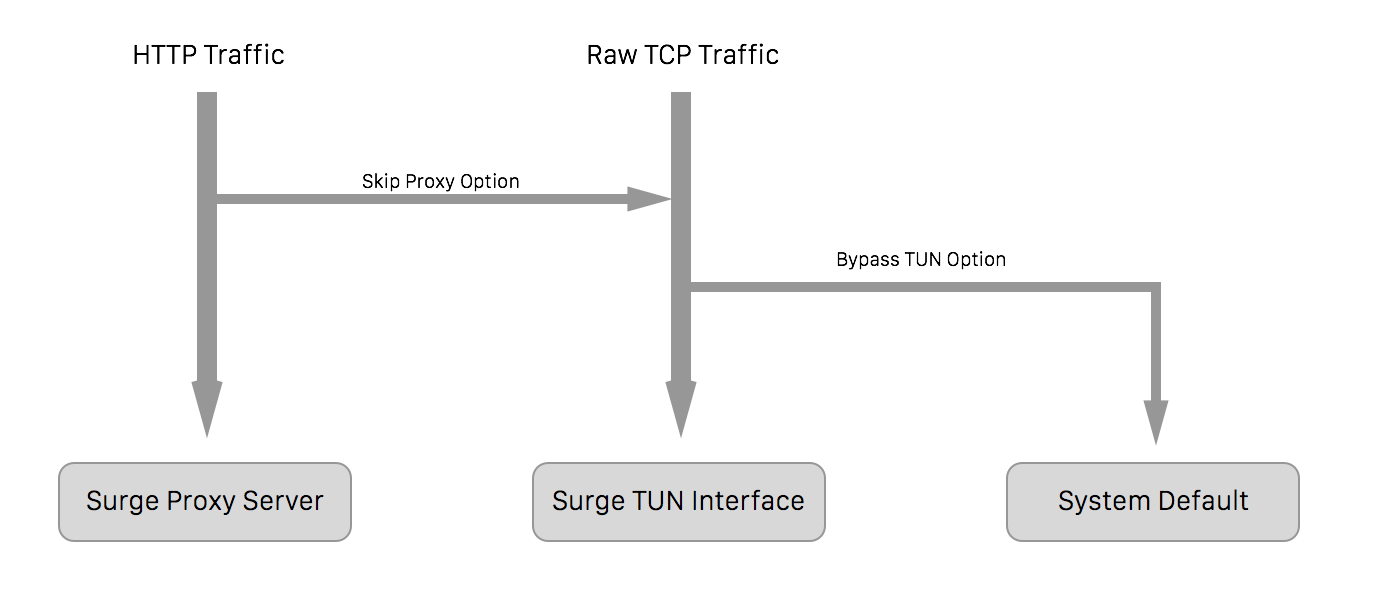
Some apps do not obey system proxy settings (such as Mail.app) because they use raw TCP sockets. The VIF captures this traffic at the IP layer and feeds it into the proxy engine. It handles only TCP, UDP, and ICMP; ICMP cannot be proxied, so the VIF answers it directly.
This is the architecture of Surge iOS:
Surge Dashboard
A graphical interface for reviewing requests, inspecting the DNS cache, and analyzing traffic. The Dashboard app ships with Surge Mac and can connect to the local instance or to a remote Surge iOS/Mac instance over the network or USB when external-controller-access is configured. See Dashboard.
surge-cli
A command-line tool bundled with Surge Mac for controlling and diagnosing local or remote Surge instances, checking profiles, and running tests. See CLI.
Where to Go Next
- Build a minimal profile: Quick Start
- Understand the profile file itself: Profile Format
- See what differs between platforms: Platform Differences